Fields
The Fields step allows you to define attributes for mining sources, which can be used later in reporting. By default, the fields DryTonnes and WetTonnes are required, as they provide the material quantity needed to determine the duration of mining tasks.
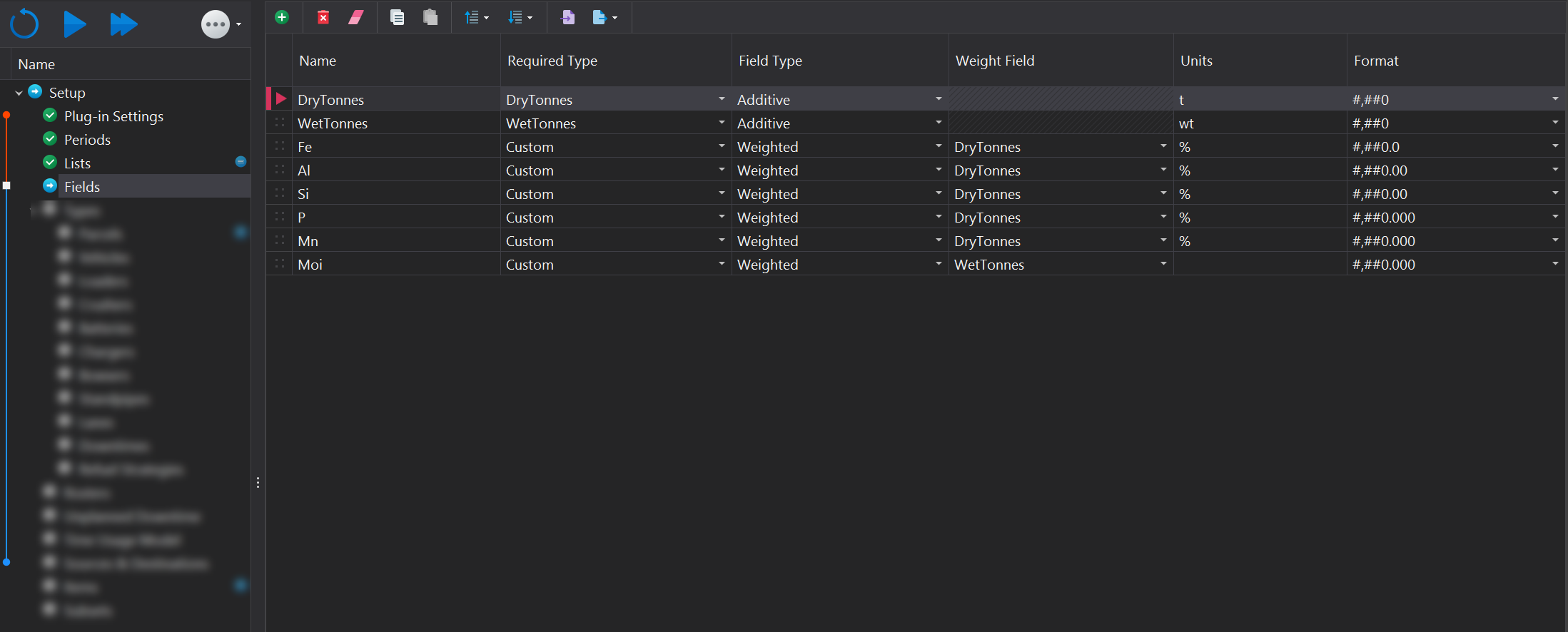
Fields are managed using the toolbar located at the top of the page. More information on the functions within the toolbar can be found in the Common User Controls page. Each field instance must have the following properties specified:
| Column | Description |
|---|---|
| Name | The name of the attribute. |
| Required Type | By default, some attributes are mandatory. These required attributes will appear in the drop-down list. If the attribute is not a mandatory one, Custom needs to be selected.
|
| Field Type | The field type determines how values are aggregated: "Additive" fields are summed, while "Weighted" fields are averaged based on their weights. |
| Weight Field | If the Field Type is set to "Weighted," this field specifies the attribute used for weighting the values. Only "Additive" Field Types can be selected for this purpose. |
| Units | The units field allows users to specify measurement units |
| Format | Select the display format for numeric fields. |